Development Interface
Setup
Alien4Cloud & Yorc
Please refer to the documentation of the Alien4Cloud & Yorc project for more information.
Two instances of Alien4Cloud and Yorc are deployed for the eFlows4HPC project. One is hosted on Juelich cloud, this instance is used for testing and integration of the software stack. The second instance is hosted on BSC cloud and is used to develop pillars use cases. Ask to the project (eflows4hpc@bsc.es) to obtain access.
Importing required components into Alien4Cloud
Some TOSCA components and topology templates need to be imported into Alien4Cloud. If you are using one of the instances deployed for the eFlows4HPC project this is already done and you can move to the next paragraph.
You should first move to the Catalog tab and then the Manage archives tab, finally click on Git import to add components
as shown in Figure 11.

Figure 11 Click on Git import to add components
You should have at least the three repositories defined as shown in Figure 12:
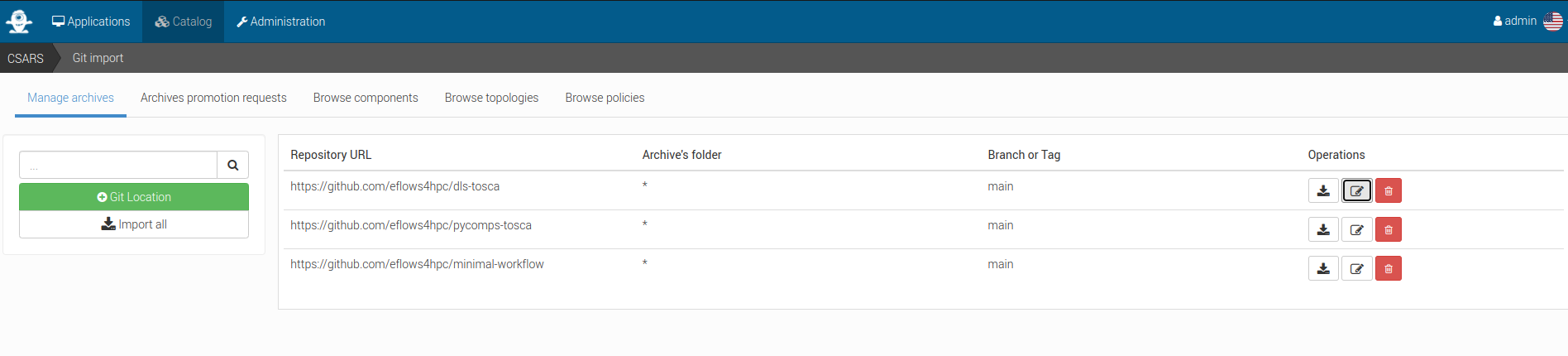
Figure 12 Click on Git location to define imports from a git repository
Click on Git location to define imports from a git repository as shown in Figure 13

Figure 13 Alien4Cloud setup a catalog git repository
Once done you can click on Import all.
Creating an application based on the minimal workflow example
Move to the Applications tab and click on New application as shown in Figure 14.
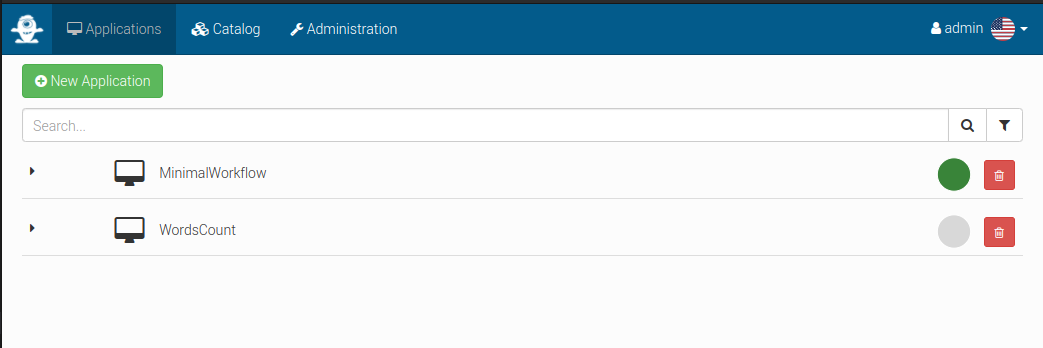
Figure 14 Manage applications in Alien4Cloud
Then create a new application based on the minimal workflow template as shown in Figure 15

Figure 15 Alien4Cloud create a template based application
Edit the topology to fit your needs as shown in Figure 16.

Figure 16 Alien4Cloud minimal workflow topology
Then click on Deploy to deploy the application as shown in Figure 17.

Figure 17 Alien4Cloud deploy an application
Make your workflow available to end-users using the HPCWaaS API
In order for the HPCWaaS API to know which workflow to allow users to use, you should add a specific tag to your Alien4Cloud application.
Move to your application main panel and under the Tags section add a tag named hpcwaas-workflows as shown in Figure 18.
The tag value should be a comma-separated list of workflow names that could be called through the HPCWaaS API.
In the minimal workflow example, this tag value should be exec_job.

Figure 18 Alien4Cloud add tags to an application
eFlows4HPC TOSCA Components
eFlows4HPC uses TOSCA to describe the high-level execution lifecycle of a workflow, enabling the orchestration of tasks with diverse nature.
To support eFlows4HPC use cases, we have defined the following TOSCA components:
Image Creation Service TOSCA component to build container images.
Data Logistics Service TOSCA components to manage data movement.
PyCOMPSs execution TOSCA component to launch and monitor PyCOMPSs jobs.
Environment TOSCA component to hold properties of an HPC cluster.
In following sections you will find a detailed description of each of these components and their configurable properties.
Section ROM Pillar I topology template describes how these components are assembled together in a TOSCA topology template to implement the ROM Pillar I use case. More specifically you can refer to Code 21 to see how properties of the TOSCA components are used in this particular context.
Image Creation Service TOSCA component
The source code of this component is available in the image-creation-tosca github repository in the eFlows4HPC organization.
This components interacts with the Image Creation Service RESTful API to trigger and monitor the creation of container images for specific hardware architectures.
Code 6 is a simplified (for the sake of clarity) version of the TOSCA type definition of the Image Creation Service that shows the configurable properties that can be set for this component.
data_types:
  imagecreation.ansible.datatypes.Machine:
    derived_from: tosca.datatypes.Root
    properties:
      platform:
        type: string
        required: true
      architecture:
        type: string
        required: true
      container_engine:
        type: string
        required: true

node_types:
  imagecreation.ansible.nodes.ImageCreation:
    derived_from: org.alien4cloud.nodes.Job
    properties:
      service_url:
        type: string
        required: true
      insecure_tls:
        type: boolean
        required: false
        default: false
      username:
        type: string
        required: true
      password:
        type: string
        required: true
      machine:
        type: imagecreation.ansible.datatypes.Machine
        required: true
      workflow:
        type: string
        required: true
      step_id:
        type: string
        required: true
      force:
        type: boolean
        required: false
        default: false
      debug:
        type: boolean
        description: Do not redact sensible information on logs
        default: false
      run_in_standard_mode:
        type: boolean
        required: false
        default: true
The
imagecreation.ansible.datatypes.Machinedata type allows to define the build-specific properties for the container image to be createdplatformis the expected operating system for instance:linux/amd64architectureis the expected processor architecture for instancesandybridgecontainer_engineis the expected container execution engine typicallydockerorsingularity
workflowproperty is the name of the workflow within the workflow-registry github repositorystep_idproperty is the name of the sub step of the given workflow in the workflow registryservice_url,insecure_tls,usernameandpasswordare properties used to connect to the Image Creation Serviceforceproperty allows to force the re-creation of the image even if an existing image with the same configuration already existsdebugwill print additional information in Alien4Cloud’s logs, some sensible information like passwords could be reveled in these logs, this should be used for debug purpose onlyrun_in_standard_modethis property controls in which TOSCA workflows this component interacts with the Image Creation Service by setting this property totruethis components will be run in thestandardmode meaning at the application deployment time. This is an advanced feature and the default value should fit most of the needs.
Data Logistics Service TOSCA components
The source code of these components is available in the dls-tosca github repository in the eFlows4HPC organization.
These components interact with the Airflow RESTful API to trigger and monitor the execution of Airflow pipelines.
These components leverage TOSCA inheritance to both allow to run generic Airflow pipelines and to make it easier to create TOSCA components
with properties specific to a given pipeline.
dls.ansible.nodes.DLSDAGRun is the parent of all others DLS TOSCA components. It allows to run any DLS pipeline with an arbitrary configuration.
Other DLS TOSCA components extend it by adding or overriding some properties.
Code 7 is a simplified version of the TOSCA type definition of the Data Logistics Service that shows the configurable properties that can be set for these components. We removed components that are note used in the Pillar I use case.
dls.ansible.nodes.DLSDAGRun:
  derived_from: org.alien4cloud.nodes.Job
  properties:
    dls_api_url:
      type: string
      required: false
    dls_api_username:
      type: string
      required: true
    dls_api_password:
      type: string
      required: true
    dag_id:
      type: string
      required: true
    extra_conf:
      type: map
      required: false
      entry_schema:
        description: map of key/value to pass to the dag as inputs
        type: string
    debug:
      type: boolean
      description: Do not redact sensible information on logs
      default: false
    user_id:
      type: string
      description: User id to use for authentication may be replaced with workflow input
      required: false
      default: ""
    vault_id:
      type: string
      description: User id to use for authentication may be replaced with workflow input
      required: false
      default: ""
    run_in_standard_mode:
      type: boolean
      required: false
      default: false
  requirements:
    - environment:
        capability: eflows4hpc.env.capabilities.ExecutionEnvironment
        relationship: tosca.relationships.DependsOn
        occurrences: [ 0, UNBOUNDED ]

dls.ansible.nodes.HTTP2SSH:
  derived_from: dls.ansible.nodes.DLSDAGRun
  properties:
    dag_id:
      type: string
      required: true
      default: plainhttp2ssh
    url:
      type: string
      description: URL of the file to transfer
      required: false
    force:
      type: boolean
      description: Force transfer of data even if target file already exists
      required: false
      default: true
    target_host:
      type: string
      description: the remote host
      required: false
    target_path:
      type: string
      description: path of the file on the remote host
      required: false
    input_name_for_url:
      type: string
      description: >
        Name of the workflow input to use to retrieve the URL.
        If an input with this name exists for the workflow, it overrides the url property.
      required: true
      default : "url"
    input_name_for_target_path:
      type: string
      description: >
        Name of the workflow input to use to retrieve the target path.
        If an input with this name exists for the workflow, it overrides the target_path property.
      required: true
      default : "target_path"

dls.ansible.nodes.DLSDAGStageInData:
  derived_from: dls.ansible.nodes.DLSDAGRun
    properties:
      oid:
        type: string
        description: Transferred Object ID
        required: false
      target_host:
        type: string
        description: the remote host
        required: false
      target_path:
        type: string
        description: path of the file on the remote host
        required: false
      input_name_for_oid:
        type: string
        description:
        required: true
        default : "oid"
      input_name_for_target_path:
        type: string
        description:
        required: true
        default : "target_path"

dls.ansible.nodes.DLSDAGStageOutData:
  derived_from: dls.ansible.nodes.DLSDAGRun
  properties:
    mid:
      type: string
      description: Uploaded Metadata ID
      required: false
    target_host:
      type: string
      description: the remote host
      required: false
    source_path:
      type: string
      description: path of the file on the remote host
      required: false
    register:
      type: boolean
      description: Should the record created in b2share be registered with data cat
      required: false
      default: false
    input_name_for_mid:
      type: string
      required: true
      default: mid
    input_name_for_source_path:
      type: string
      required: true
      default: source_path
    input_name_for_register:
      type: string
      required: true
      default: register

dls.ansible.nodes.DLSDAGImageTransfer:
  derived_from: dls.ansible.nodes.DLSDAGRun
  properties:
    image_id:
      type: string
      description: The image id to transfer
      required: false
    target_host:
      type: string
      description: the remote host
      required: false
    target_path:
      type: string
      description: path of the file on the remote host
      required: false
    run_in_standard_mode:
      type: boolean
      required: false
      default: true
dls.ansible.nodes.DLSDAGRunis the parent TOSCA component with the following properties:dls_api_url,dls_api_usernameanddls_api_passwordare used to connect to the Airflow REST API.dls_api_urlcould be overridden by thedls_api_urlattribute of aeflows4hpc.env.nodes.AbstractEnvironmentif components are linked togetherdls_api_usernameanddls_api_passwordcan be provided as plain text for testing purpose but the recommended way to provide it is to use theget_secretTOSCA function as shown in Code 21
dag_idis the unique identifier of the DLS pipeline to runextra_confis a map of key/value properties to be used as input parameters for the DLS pipelinedebugwill print additional information in Alien4Cloud’s logs, some sensible information like passwords could be reveled in these logs, this should be used for debug purpose onlyuser_idandvault_idare credentials to be used connect to the HPC cluster for data transferrun_in_standard_modethis property controls in which TOSCA workflows this component interacts with the DLS by setting this property totruethis components will be run in thestandardmode meaning at the application deployment time. This is an advanced feature and the default value should fit most of the needs and it is overridden in derived TOSCA components if needed.
dls.ansible.nodes.HTTP2SSHis a TOSCA component that allows to trigger a pipeline that will download a file and copy it to a cluster through SSHdag_idoverrides the pipeline identifier toplainhttp2sshurlis the URL of the file to be downloadedforceforces transfer of data even if target file already existstarget_hostthe remote host to copy file on. This could be overridden by thecluster_login_hostattribute of aeflows4hpc.env.nodes.AbstractEnvironmentif components are linked together.input_name_for_urlis the name of the workflow input to use to retrieve the URL. If an input with this name exists for the workflow, it overrides the url property. The default value isurl.input_name_for_target_pathis the name of the workflow input to use to retrieve the target path. If an input with this name exists for the workflow, it overrides the target_path property. The default value istarget_path.
dls.ansible.nodes.DLSDAGStageInDatainteracts with the DLS pipeline that download data from the data catalogu and copy it to the HPC cluster through SSHoidis the Obejct ID of the file in the data cataloguetarget_hostthe remote host to copy data to. This could be overridden by thecluster_login_hostattribute of aeflows4hpc.env.nodes.AbstractEnvironmentif components are linked together.target_pathis the path of a directory to store the file on the remote hostinput_name_for_oidis the name of the workflow input to use to retrieve the OID. If an input with this name exists for the workflow, it overrides the oid property. The default value isoid.input_name_for_target_pathis the name of the workflow input to use to retrieve the target path. If an input with this name exists for the workflow, it overrides the target_path property. The default value istarget_path.
dls.ansible.nodes.DLSDAGStageOutDatainteracts with the DLS pipeline that copy data from the HPC cluster through SSH and upload it to the data cataloguemidis the Metadata ID of the file in the data cataloguetarget_hostthe remote host to copy data from. This could be overridden by thecluster_login_hostattribute of aeflows4hpc.env.nodes.AbstractEnvironmentif components are linked together.source_pathis the path of the file on the remote hostregistercontrols if the record created in b2share should be registered within the data catalogueinput_name_for_midis the name of the workflow input to use to retrieve the MID. If an input with this name exists for the workflow, it overrides the mid property. The default value ismid.input_name_for_source_pathis the name of the workflow input to use to retrieve the source path. If an input with this name exists for the workflow, it overrides the source_path property. The default value issource_path.input_name_for_registeris the name of the workflow input to use to retrieve the register flag. If an input with this name exists for the workflow, it overrides the register property. The default value isregister.
dls.ansible.nodes.DLSDAGImageTransfer:image_idis the identifier of the container image to transfer from the Image Creation Service. If this component is linked to an Image Creation Service component then this id is automatically retrieved from the image creation execution.target_hostthe remote host to copy the container image to. This could be overridden by thecluster_login_hostattribute of aeflows4hpc.env.nodes.AbstractEnvironmentif components are linked together.target_pathis the path of the container image on the remote hostrun_in_standard_modecontainer image creation is typically designed to be run at application deployment time so this property is overridden to run at this stage.
PyCOMPSs TOSCA component
The source code of this component is available in the pycompss-yorc-plugin github repository in the eFlows4HPC organization.
This component is different from the above ones as it does not have an implementation in pure TOSCA. Instead the implementation is done by a plugin directly shipped with the Yorc orchestrator. This allows to handle more complex use-cases like interacting with workflows inputs.
That said a TOSCA component should still be defined to configure how the plugin will run the PyCOMPSs job.
Code 8 is a simplified version of the TOSCA type definition of the PyCOMPSs execution that shows the configurable properties that can be set for this component.
data_types:
  org.eflows4hpc.pycompss.plugin.types.ContainerOptions:
    derived_from: tosca.datatypes.Root
    properties:
      container_image:
        type: string
        required: false
        default: ""
      container_compss_path:
        type: string
        required: false
        default: ""
      container_opts:
        type: string
        required: false
        default: ""

  org.eflows4hpc.pycompss.plugin.types.COMPSsApplication:
    derived_from: tosca.datatypes.Root
    properties:
      command:
        type: string
        required: true
      arguments:
        type: list
        required: false
        entry_schema:
          description: list of arguments
          type: string
      container_opts:
        type: org.eflows4hpc.pycompss.plugin.types.ContainerOptions


  org.eflows4hpc.pycompss.plugin.types.SubmissionParams:
    derived_from: tosca.datatypes.Root
    properties:
      compss_modules:
        type: list
        required: false
        entry_schema:
          description: list of arguments
          type: string
        default: ["compss/3.0", "singularity"]
      num_nodes:
        type: integer
        required: false
        default: 1
      qos:
        type: string
        required: false
        default: debug
      python_interpreter:
        type: string
        required: false
        default: ""
      extra_compss_opts:
        type: string
        required: false
        default: ""

  org.eflows4hpc.pycompss.plugin.types.Environment:
    derived_from: tosca.datatypes.Root
    properties:
      endpoint:
        type: string
        description: The endpoint of the pycomps server
        required: false
      user_name:
        type: string
        description: user used to connect to the cluster may be overridden by a workflow input
        required: false

node_types:
  org.eflows4hpc.pycompss.plugin.nodes.PyCOMPSJob:
    derived_from: org.alien4cloud.nodes.Job
    metadata:
      icon: COMPSs-logo.png
    properties:
      environment:
        type: org.eflows4hpc.pycompss.plugin.types.Environment
        required: false

      submission_params:
        type: org.eflows4hpc.pycompss.plugin.types.SubmissionParams
        required: false

      application:
        type: org.eflows4hpc.pycompss.plugin.types.COMPSsApplication
        required: false

      keep_environment:
        type: boolean
        default: false
        required: false
        description: keep pycompss environment for troubleshooting
    requirements:
      - img_transfer:
          capability: tosca.capabilities.Node
          relationship: tosca.relationships.DependsOn
          occurrences: [ 0, UNBOUNDED ]
      - environment:
          capability: eflows4hpc.env.capabilities.ExecutionEnvironment
          relationship: tosca.relationships.DependsOn
          occurrences: [ 0, UNBOUNDED ]
The
org.eflows4hpc.pycompss.plugin.types.ContainerOptionsdata type allows to define container specific options for the PyCOMPSs jobcontainer_imageis the path the container image to use to run the execution. If connected to adls.ansible.nodes.DLSDAGImageTransfercomponent the path of the transferred image is automatically detected.container_compss_pathis the path where compss is installed in the container imagecontainer_optsare the options to pass to the container engine
The
org.eflows4hpc.pycompss.plugin.types.COMPSsApplicationdata type allows to define how a PyCOMPSs application is runcommandis the actual command to runargumentsis a list of argumentscontainer_optsisorg.eflows4hpc.pycompss.plugin.types.ContainerOptionsdata type described above
The
org.eflows4hpc.pycompss.plugin.types.SubmissionParamsdata type defines PyCOMPSs parameters related to job submissioncompss_modulesis the list of modules to load for the job. This could be overridden by thepycompss_modulesattribute of aeflows4hpc.env.nodes.AbstractEnvironmentif components are linked together.num_nodesis the number of nodes a job should run onqosis the quality of Service to pass to the queue systempython_interpreterPython interpreter to use (python/python3)extra_compss_optsis an arbitrary list of extra options to pass to PyCOMPSs
The
org.eflows4hpc.pycompss.plugin.types.Environmentdata type define properties related to the cluster where the job should be runendpointthe remote host to run jobs on. This could be overridden by thecluster_login_hostattribute of aeflows4hpc.env.nodes.AbstractEnvironmentif components are linked together.user_nameuser used to connect to the cluster may be overridden by a workflow input
The
org.eflows4hpc.pycompss.plugin.nodes.PyCOMPSJobTOSCA componentenvironmentisorg.eflows4hpc.pycompss.plugin.types.Environmentdata type described abovesubmission_paramsisorg.eflows4hpc.pycompss.plugin.types.SubmissionParamsdata type described aboveapplicationisorg.eflows4hpc.pycompss.plugin.types.COMPSsApplicationdata type described abovekeep_environmentis a flag to keep pycompss execution data for troubleshooting
Environment TOSCA component
The source code of this component is available in the environment-tosca github repository in the eFlows4HPC organization.
This components holds properties of an HPC cluster. It is an abstract TOSCA component, meaning that it’s values does not need to be known when designing the application and can be matched to a concrete type just before the deployment. This is a powerful tool combined with Alien4Cloud’s services that allows to define concrete types for abstract components.
Code 9 is a simplified version of the TOSCA type definition of the Environment that shows attributes of this component.
eflows4hpc.env.nodes.AbstractEnvironment:
  derived_from: tosca.nodes.Root
  abstract: true
  attributes:
    cluster_login_host:
      type: string
    pycompss_modules:
      type: string
    dls_api_url:
      type: string
cluster_login_hostthe host (generally a login node) of the HPC cluster to connects topycompss_modulesa coma-separated list of PyCOMPSs modules installed on this cluster and that should be loaded by PyCOMPSsdls_api_urlthe URL of the Data Logistics Service API